Guide
Uptime Kuma on your phone, loud enough to wake you.
Kuma already publishes the state of every monitor it runs. Nightbell can read that list on a schedule and turn a red monitor into an alarm that takes the whole screen. Nothing to install on the Kuma side.
Kuma already says which monitors are down. It says it at /metrics.
Uptime Kuma serves a Prometheus page at /metrics. Among the response times and certificate dates there is one line per monitor called monitor_status, and its value is the state. Kuma prints the legend itself, right above the lines: 1 is up, 0 is down, 2 is pending, 3 is maintenance.
Nightbell has a Prometheus monitor that reads pages like this one, and it checks every line that matches, not just the first. So one monitor on the phone covers every monitor in Kuma, and when one goes down the alarm names it.
I tested this against Uptime Kuma 2.5.9 in Docker, with one monitor up and one pointed at a closed port. This is what its page said, cut down to the lines that matter:
$ curl -s -u :$KUMA_KEY https://kuma.example.net/metrics | grep monitor_status
# HELP monitor_status Monitor Status (1 = UP, 0= DOWN, 2= PENDING, 3= MAINTENANCE)
# TYPE monitor_status gauge
monitor_status{monitor_id="1",monitor_name="Website",monitor_type="http",monitor_url="http://localhost:3001/",monitor_hostname="null",monitor_port="null"} 1
monitor_status{monitor_id="2",monitor_name="API",monitor_type="http",monitor_url="http://127.0.0.1:9/",monitor_hostname="null",monitor_port="null"} 0
Worth running before you touch the phone. If curl prints these lines, the key works and Nightbell will see exactly the same thing. A 401 means the key is wrong or disabled.
Each of the four values reads like this to a monitor set to not equal 0:
- 1, up
- passes
Nothing to see.
- 0, down
- fails, names the monitor
The check fails on that line and quotes it, labels and all, so the alarm says which Kuma monitor went.
- 2, pending
- passes
Kuma is retrying before it decides. Waking you for every retry is how alarms end up muted.
- 3, maintenance
- passes
You put it there yourself.
Setting it up.
- 01
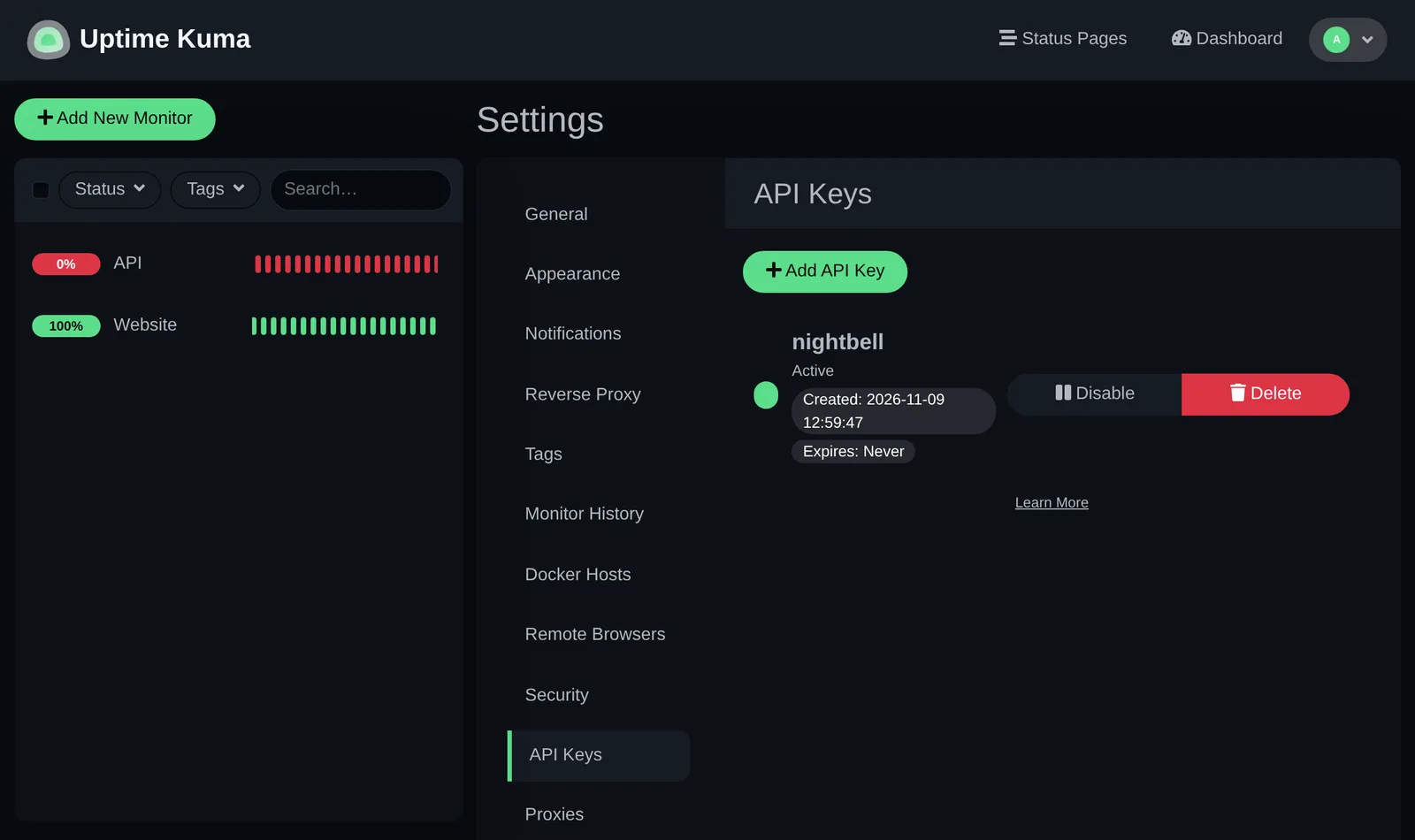
Make an API key in Kuma
Settings, API Keys, Add API Key. Give it a name and tick Don't expire, or put a reminder in your calendar for the date you pick. Kuma locks
/metricsbehind basic auth, and the key is the password.
- 02
Add a Prometheus monitor in Nightbell
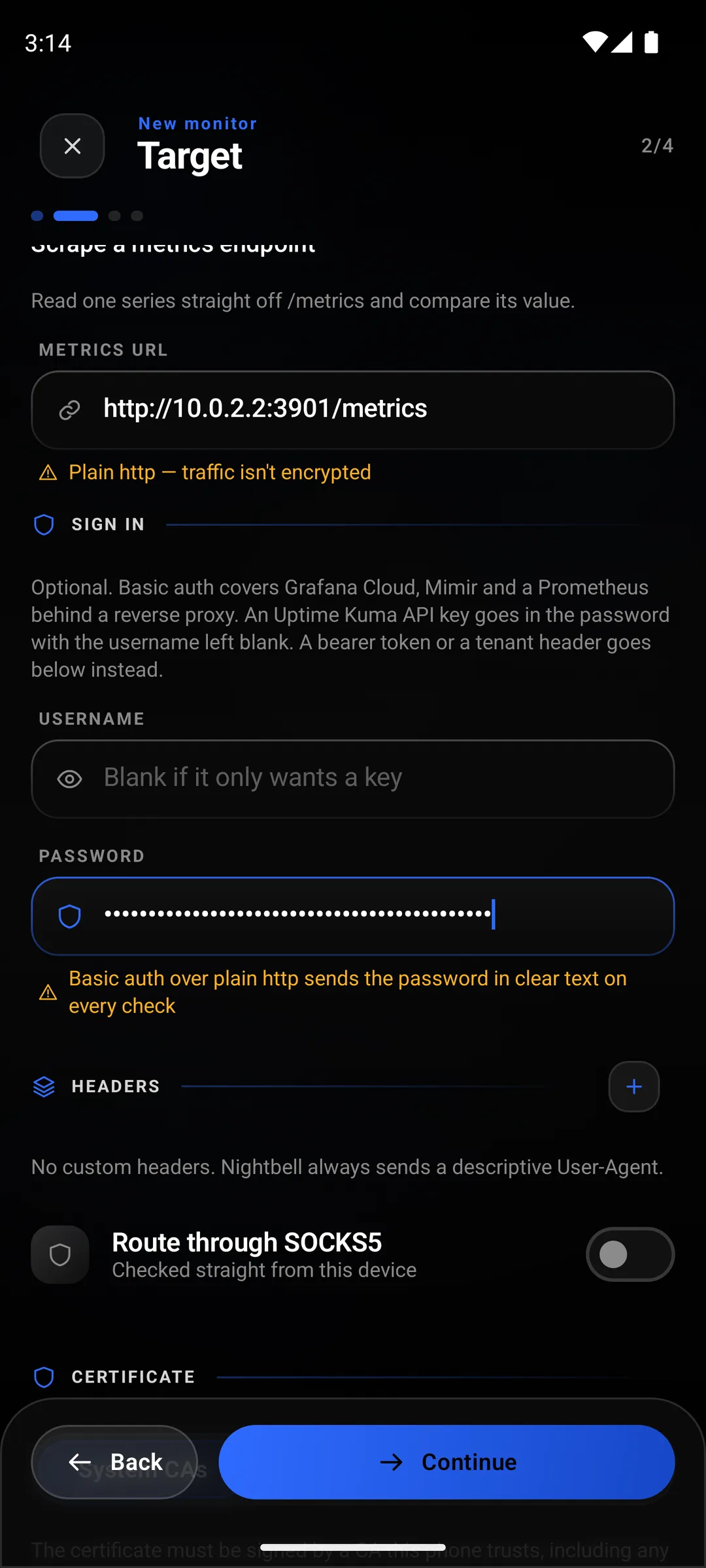
Leave the source on Metrics and give it the full address, path included:
https://kuma.example.net/metrics. - 03
Leave the username blank, put the key in the password
Kuma ignores the username. Over plain
http://the key travels in clear text on every check, and the app will tell you so. - 04
Metric monitor_status, not equal to 0
Type it, or use Browse this endpoint and pick it from the list. Then Not equal, and 0 as the threshold.
Not equal to 0 rather than equal to 1 is on purpose. A monitor Kuma is retrying sits at 2 and one in a maintenance window sits at 3, and neither should wake anybody.
- 05
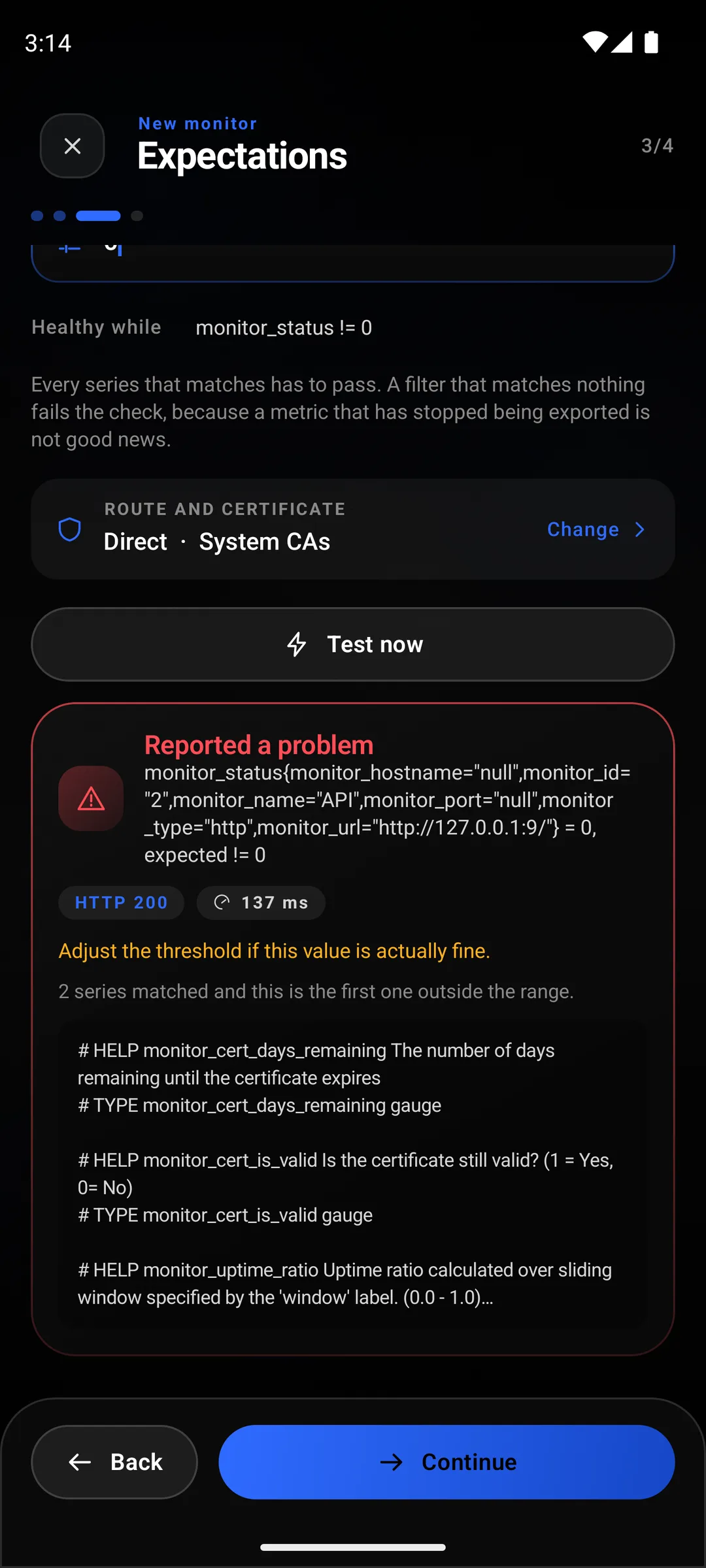
Test now, then make it urgent
With everything up the test reads
2 series, all != 0, one series per Kuma monitor. Set the alert to urgent on the last step, or a down Kuma monitor arrives as an ordinary notification.
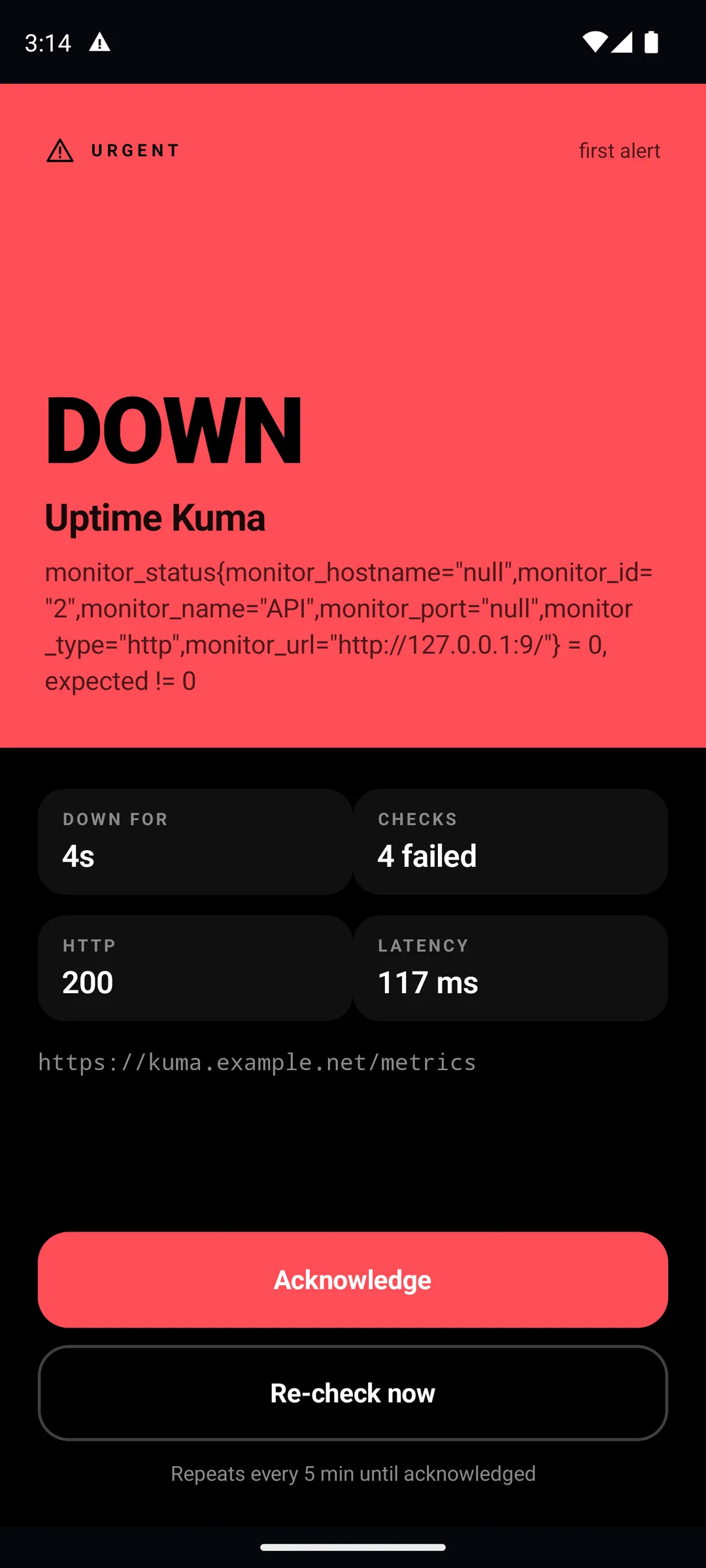
What you get when a Kuma monitor goes down.
On its next check the phone reads the 0, and the monitor goes down with the line that did it. Set to urgent, that is a page over the lock screen that repeats, every five minutes by default, until you acknowledge it. Kuma answered fine, so the page shows its 200 and how long it took: the thing that broke is the monitor Kuma was watching, not Kuma.
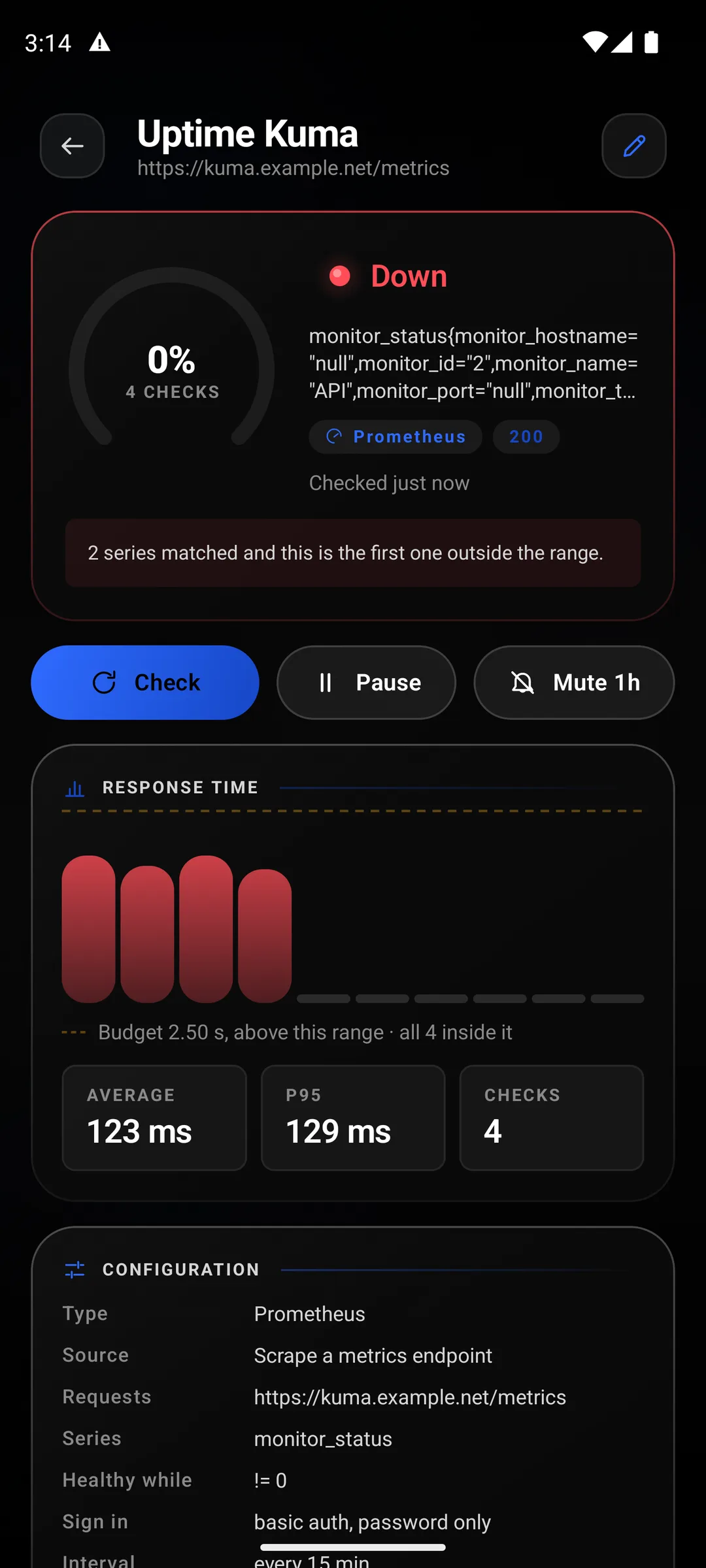
Watching one Kuma monitor instead of all of them.
Add a label filter: monitor_name="API". Now that monitor only reads the one line, and the rest of Kuma can be red without it caring. This is how you give one service an urgent alarm and leave the others as notifications: one Nightbell monitor per Kuma monitor you care about at 3am, each with its own alert setting.
What this does not do.
It is not instant. Kuma notices a failure inside its own interval, a minute by default. The phone hears about it on its next check, and by default Android runs those every fifteen minutes or later. Strict monitoring gets that down to one minute for the price of a permanent notification. The background limits page explains where that floor comes from.
When Kuma itself goes down, this goes down too, because the page it reads is gone. That is the useful half. A Kuma that crashed or lost its certificate sends nothing, and its dashboard has nobody to tell. A phone reading it from another network is the thing that notices.
It does not show you Kuma's history or its status pages. Nightbell keeps its own history of what it read, and that is all. Kuma stays the place to look things up.